Powered By


Powered By
Powered By
High up on Google matters to every small business. Many recognize terms like keywords, also the value of links pointing to their site. Yet by 2026, something else plays a stronger role - hidden in plain sight. A group of speed signals now shapes position. Few owners notice these signs. Despite being built into how pages rise or fall. Google quietly counts them.
These are named Core Web Vitals - they track how smoothly your site runs for people using it. Not its design. Not the words tucked into pages. Speed of loading, steadiness during use, responsiveness after a click shape what matters.
Right now, Google might be ranking your site lower because of poor Core Web Vitals - worse, you could be completely unaware. A slow loading time drags down user experience, which search engines notice. When pages take too long to respond, visitors leave fast. That behavior signals low quality to algorithms. Missing key performance markers means losing visibility slowly. Even if traffic seems stable, hidden drops can happen. Poor scores today lead to fewer clicks tomorrow. Without fixing these issues, recovery takes much longer. What feels minor now creates big gaps later.
Picture this. Google checks how fast a page loads by watching when stuff first shows up on screen. Here’s what matters now through 2026. A different number tracks if elements jump around while loading. Another piece looks at responsiveness - how quickly the site reacts when clicked or tapped. Think of it like this. These signals help decide whether visitors find things smooth or frustrating. One after another, they paint a picture of real-world browsing feel.
LCP shows the moment your page's biggest piece finally appears. Think of that big picture at the top. Or maybe the bold title catching your eye. It clocks how fast that part loads completely. A number below two point five seconds means things are moving well. Slower than four seconds? That feels like waiting too long. The wait ends when the main thing snaps into place.
Picture this: someone lands on your page, eyes scanning - what they spot first matters most. When the key stuff takes longer than two and a half seconds to show up, it feels slow. That delay? Google marks it down as less than ideal.
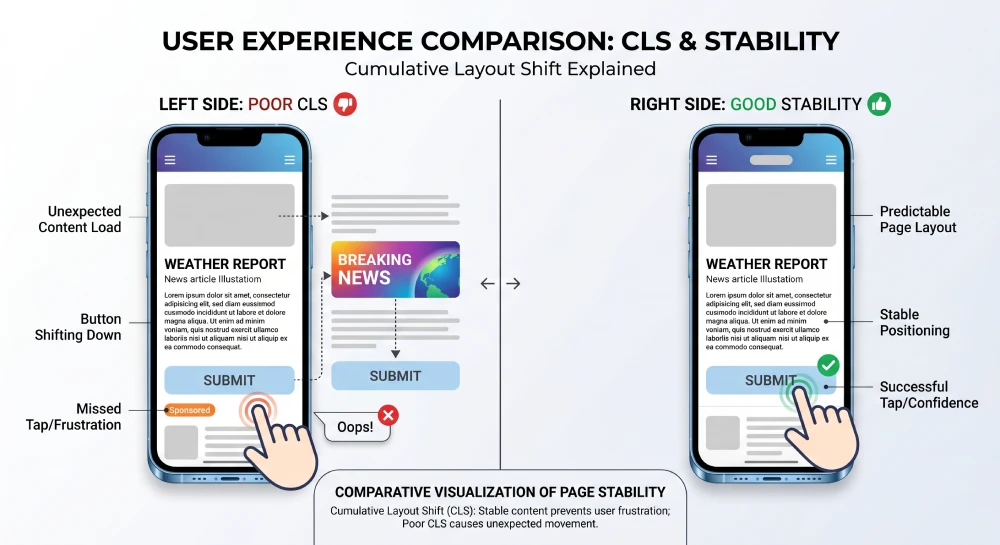
Picture this. A visitor opens your site. The screen jolts. Words slide down mid-read. Buttons dodge fingers right before taps land. That wobble has a name - CLS. It tracks how violently elements shift during load. Think of images arriving late and shoving paragraphs aside. Or ads popping in beneath thumbs. Smooth feels under 0.1. Bumpiness shows at 0.25 and up.
Clicking something only to see it slip out of reach - that irritation has a name. Sites get flagged by Google when buttons move like this. It counts as bad design since people end up frustrated trying to interact.
When someone clicks or types on your site, INP tracks how fast the screen updates next. A response time below 200 milliseconds means things are running smoothly. If delays stretch past half a second, that counts as slow. Touch, tap, type - each triggers a reaction the browser must paint visibly. Speed matters because eyes notice when feedback drags. Half a second feels like waiting; under two hundred ticks feels instant. Longer waits break flow, shorter ones keep it moving.
Now called INP, what used to be FID changed in March 2024. Your page’s reaction time across the full visit matters more than that initial tap alone. Think dropdowns, buttons, places where users type - those spots rely heavily on this shift. Because interaction doesn’t stop after one click, performance now follows along.
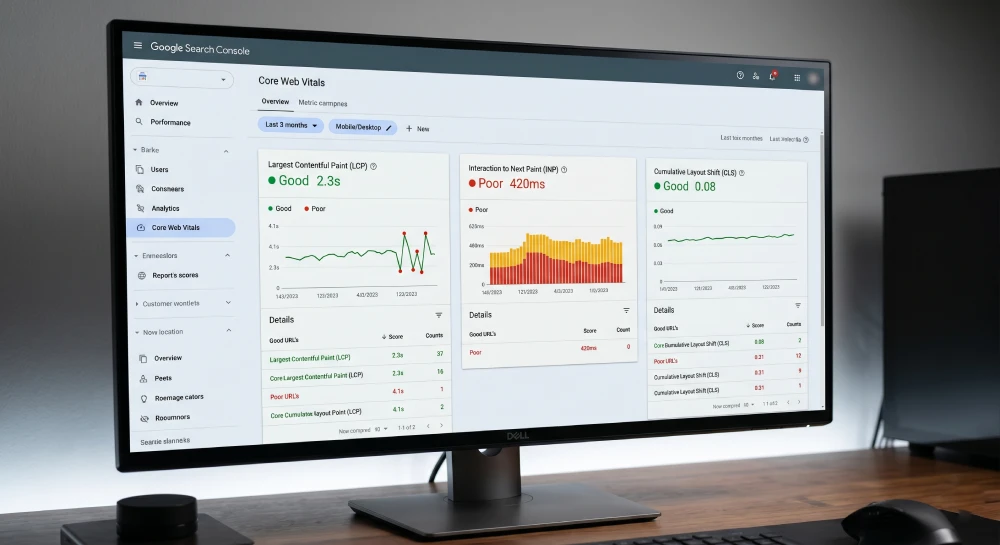
Back in 2021, Google made Core Web Vitals an official part of how it ranks pages, thanks to the Page Experience Update. By 2026, those vitals still matter just as much when deciding search position. A site showing “Good” across all three measurements tends to outrank another one like it if that second site lands in the “Poor” zone instead. Though numbers aren’t everything, they do tip the scale under certain conditions. Performance seen through these lenses shapes visibility more than many realize.
Beyond rankings, the business case is straightforward:
For Poor LCP (Loading Speed):
For Poor CLS (Visual Stability):
For Poor INP (Responsiveness):
Every site we build at ItsProWebsite runs on Core Web Vitals by default. Fast loading comes standard because speed shapes how people stay or leave.
Unlike WordPress websites that rely on plugin stacks - which notoriously harm Core Web Vitals - our custom website design delivers clean, optimized code that performs well on all three metrics from day one.
You can see our approach to performance as one of the key features of every website we build.
Should your site exist yet face Core Web Vitals issues, performance checks and fixes come built into our SEO packages. Month by month, we watch those metrics, stepping in the moment something slips. That way, drops in rank stay avoided.
Should a complete site redesign feel too big right now, try these steps without delay: Start small. Pick one page to refresh. Fix broken links before moving further. Swap outdated photos for clearer ones. Reword confusing sentences so they make sense fast. Test how quickly pages load on mobile. Ask someone unfamiliar with your site what stands out. Tackle navigation next - make it obvious where people should click. Update contact details everywhere they appear. Remove anything that no longer serves a purpose.
What users see when loading your site isn’t just code - it shapes how Google views you, how visitors stay or leave, also whether pages convert. Speed, responsiveness, visual stability - these aren’t developer details alone - they shape trust, ranking, revenue. A slow page feels like hesitation; people notice before they think. How fast elements settle changes if someone reads further - or closes the tab. Rankings shift based on real behavior, not guesses. Frustration builds silently in janky animations or delayed buttons. Happy browsing sticks around longer, clicks deeper, buys more often. Tech metrics tie directly to cash flow, one load at a time.
In 2026, with Google's AI Overviews and competitive search landscapes, every ranking advantage matters. A website that passes all three Core Web Vitals metrics is a stronger competitor than one that doesn't - regardless of how good its content is.
Contact us today for a free Core Web Vitals audit, or book an appointment to discuss how a new professionally built website can give you a performance advantage your competitors won't have.
LCP stands for Largest Contentful Paint. It measures how long it takes for the main visible content on a webpage to fully load for users.
Google recommends keeping Largest Contentful Paint under 2.5 seconds to provide a good user experience and maintain strong website performance.
CLS stands for Cumulative Layout Shift. It measures unexpected movement of elements on a webpage while the page is loading.
A high CLS score creates a frustrating user experience because buttons, images, or text move unexpectedly while visitors are trying to interact with the page.
981 Main St West, Hamilton, ON L8S 1A8, Canada.

Priyank Patel is the Founder & CEO of HRINFOCARE Limited. With over 20 years of experience in web development, software solutions, AI integration, SEO, and business automation, he has helped companies across Canada, the United States, and internationally build scalable digital solutions.
Unlike traditional agencies where consultations are handled by sales representatives, your strategy session is conducted directly by Priyank, providing practical business and technical guidance based on real-world experience.

